Tuesday, 18 January 2022

Export D365 F&O data to Azure Data Lake

Azure Data Lake        

Azure Data Lake is a fully managed, scalable, and highly available service from Microsoft. It includes built-in disaster recovery. 

When you enable the Export to Azure Data Lake add-in, you connect your F&O environment to a designated data lake. Authorized users can then copy data from your F&O environment to that data lake. Tools such as Power BI and Azure Synapse enable analytics, business intelligence, and machine learning scenarios for data in the data lake.


Data that is stored in the data lake is organized in a folder structure that uses Common Data Model format. Common Data Model format provides additional metadata in a machine-readable JavaScript Object Notation (JSON) format, so that downstream tools can determine the semantics of the data. The additional metadata includes the table structure, descriptions, and data types.

  • Model.json
    • Metadata file contains information about entity records/attributes and links to data files


  • Data Files
    • Data files have well-defined structure and format and are references in model.json file
    • Files must be in .csv format without header information
    • Columns defined in model.json
    • CSV files containing the data

Configure Export to Data Lake

Reference :- Source from Microsoft Docs


Monday, 20 December 2021

LCS API to start and stop customer managed environments D365 F&O

Microsoft has released the LCS API to start and stop customer managed environments. Using these APIs will ensure the LCS environment status is synced with the actual environment.

Now you can start and stop environments through Microsoft Dynamics Lifecycle Services (LCS) via the LCS Environment API.

  • Only Customer-managed environments are supported. Self-service environments do not have the same concept of stop and start and are not supported by this API. Microsoft-managed environments are not supported.
  • These APIs will trigger/invoke the operation. A successful response only indicates that the trigger was successful.
  • For stop, non-success will be returned if the environment is already undergoing another operation or if the environment is already stopped.
  • For start, non-success will be returned if the environment is already undergoing another operation but will return success if the environment is already started.


Other useful LCS API's

Sunday, 10 October 2021

How to get last exception error message using x++ code

private InfologText getInfoLogMessage(int _infologPosition, Exception _logLevel, boolean _resetInfoLog)  

{

       #define.NewLine('\n')

    SysInfologEnumerator        enumerator = SysInfologEnumerator::newData(infolog.copy(max(_infologPosition,1), Global::infologLine()));

       SysInfologMessageStruct      msgStruct;

       Exception                           exception;

       InfologText                 infotext;

    while(enumerator.moveNext())

    {

           msgStruct = SysInfologMessageStruct::construct(enumerator.currentMessage());

           exception = enumerator.currentException();


           if(_logLevel == Exception::Info || _logLevel == exception

        || (_logLevel == Exception::Warning && exception == Exception::Error))

           {

                  if(infotext)

                  {

                         infotext += #NewLine;

                  }


                  infotext += strFmt('%1', msgStruct.message());

           }

    }

    if(_resetInfoLog)

    {

           infolog.clear(_infologPosition);

    }

}

Tuesday, 20 April 2021

How to use Excel Office Scripts in Power Automate

Office Scripts

Office Scripts in Excel is a new feature in Office365 that allows you to Automate your day-to-day tasks using power automate


  • You can record your Excel actions with the Action Recorder, which creates a script. 
  • You can also create and edit scripts with the Code Editor. Your scripts can then be shared across your organization so your coworkers can also automate their workflows.
  • TypeScript is a superset of JavaScript.
  • Every script runs the code in a single main method.
Connecting Office Scripts to Power Automate


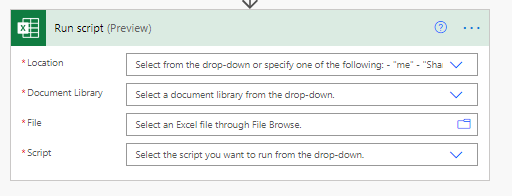
Connectors are the bridges between Power Automate and applications. The Excel Online (Business) connector gives your flows access to Excel workbooks. The "Run script" action lets you call any Office Script accessible through the selected workbook. You can also give your scripts input parameters so data can be provided by the flow, or have your script return information for later steps in the flow.

The Excel Online (Business) connector has been a valuable part of the Power Automate ecosystem for some time now. It has a wide variety of applications

Prerequisites
In order to run Office Scripts via Power Automate, the following must be true:
  • Your organization must have enabled Office Scripts via the switch in the Office Admin Portal
  • Your organization must have enabled Power Automate and the Excel Online (Business) connector
Create an Office Script
  1. Go to the Automate tab and select All Scripts.
  2. Select New Script.
  3. Create script
  4. Rename the script to . Press the script name to change it.
  5. Save the script by pressing Save Script.
Example


Create an automated workflow with Power Automate

I have created a flow, to create separate files based on the excel header column.


Calling the created office script in power automate.

Please find below some handy scripts.

Format a Table

Below script used to format a table with excel data

function main(workbook: ExcelScript.Workbook, sheetName: string

  tableRowRange: workbook.getWorksheet(sheetName)   

  workbook.getWorksheet(sheetName).addTable(workbook.getWorksheet(sheetName).getRange('A1').getSurroundingRegion(), true);  

  workbook.setIsDirty(true

}


Get Column Names

Below script used to get excel header column details

function main(workbook: ExcelScript.Workbook, rangeAddress: string): string {

  let sh = workbook.getFirstWorksheet();

  let rg = sh.getRange(rangeAddress)

  return JSON.stringify(rg.getValues());

Format a table without a header columns

function main(workbook: ExcelScript.Workbook, sheetName: string, ) 

  tableRowRange: workbook.getWorksheet(sheetName)  

 workbook.getWorksheet(sheetName).addTable(workbook.getWorksheet(sheetName).getRange('A1:AY70'), false); 

// 'A1:AY70' refers to columnrow

  workbook.setIsDirty(true) 

}

Delete empty row 

function main(workbook: ExcelScript.Workbook) {
  let selectedSheet = workbook.getActiveWorksheet();
  let table = selectedSheet.getTables()[0];
  let tableDataRange = table.getRangeBetweenHeaderAndTotal();
  let dataValues = tableDataRange.getValues();

  let removed = 0;
  // Important that you go from bottom to top to account for removing correct rows. 
  for (let i = dataValues.length-1; i >=0 ; i--) {
    let [event, date] = dataValues[i];
    if (event === '' || date === '') {
      // tableDataRange.getRow(i).getFormat().getFill().setColor('Yellow');      
      table.deleteRowsAt(i);
      removed++;
    }
  }
  console.log(`Removed ${removed} rows.`)
}

Wednesday, 19 August 2020

How to Open multiple instances of Report at the same time using X++ code in AX 2012


    Many times it is needed to display multiple reports on screen. In standard Dynamics AX 2012, if you try to call multiple times, a report; it will open 2nd report, after 1st instance of report viewer is closed. A user may be looking for, display of multiple instances at same time, without closing other.

Using controller class dialogShow method,

class VendInvoiceAttachmentController extends SrsReportRunController
{
    #define.ReportName('VendInvoiceAttachment.Report')

} 

public static void main(Args _args)
{
    VendInvoiceAttachmentController controller = new VendInvoiceAttachmentController();
 
    controller.parmReportName(#ReportName);
    controller.parmArgs(_args);
    controller.parmLoadFromSysLastValue(false);
    //controller.startOperation();
 
    if (controller.prompt())
    {
        controller.preRunModifyContract();
    }
}
 
protected void preRunModifyContract()
{
    SRSPrintDestinationSettings     settings;
    Query                           query;
    QueryRun                        queryRun;
    VendInvoiceJour                 vendInvoiceJour;
    SRSReportExecutionInfo          executionInfo;
 
    settings = this.parmReportContract().parmPrintSettings();
 
    if (settings.printMediumType() != SRSPrintMediumType::Printer &&
        settings.printMediumType() != SRSPrintMediumType::Screen)
    {
        throw error(strFmt("@$AB59", settings.printMediumType()));
    }
 
    query       = this.getFirstQuery();
    queryRun    = new QueryRun(query);
 
    while (queryRun.next())
    {
        vendInvoiceJour  = queryRun.get(tableNum(VendInvoiceJour));
 
        this.printAttachements(vendInvoiceJour.RecId);
 
        // create a instance of ReportExecutionInfo & set it on contract. This will get used while running report.
        executionInfo = new SRSReportExecutionInfo();
        executionInfo.parmReportRunId(reportRunId);
        reportContract.parmReportExecutionInfo(executionInfo);
 
        //Range
        SrsReportHelper::addParameterValueRangeToQuery(this.getFirstQuery(),tableNum(VendInvoiceJour),fieldNum(VendInvoiceJour, RecId),SysQuery::value(vendInvoiceJour.RecId));
 
        if (settings.printMediumType() == SRSPrintMediumType::Screen)
        {
            // pre report run
            this.parmReportRun().preRunReport();
            this.runToScreen();
        }
 
        if (settings.printMediumType() == SRSPrintMediumType::Printer)
        {
            // pre report run
            this.parmReportRun().preRunReport();
            this.parmReportRun().runReport();
        }
    }
}
 
Run multiple reports to screen
When printing multiple reports to screen in code, the previous printed report will block the next one, untill user closes the previous one, the next one starts rendering. This is anoying if user needs to print multiple reports to screen as a batch. The solution to this is simple, we just need to create a class to extend SrsReportRunController and overwrite the methods dialogShow and dialogClose. See sample below
 
protected void dialogShow()
{
    SysOperationDialog  sysOperationDialog;
    FormRun             formRun;
 
    if (useReportViewerForm)
    {
        dialog.run();
        this.dialogPostRun();
 
        sysOperationDialog  = dialog as SysOperationDialog;
        formRun             = sysOperationDialog.formRun();
        formRun.detach();
    }
    else
    {
        super();
    }

}


protected void dialogClose()
{
    if(!useReportViewerForm)
    {
        super();
    }

}


References:

https://community.dynamics.com/365/financeandoperations/b/microsoftdynamicsaxextensions/posts/open-multiple-instances-of-report-at-same-time

http://xhellot.blogspot.com/2016/08/how-to-run-ssrs-report-from-x-code-in_8.html

Table metadata extract to Excel file using X++ code

Hello all,

Today I want to show you how to extract Table metadata properties i.e Field Name, label, size, EDT

Here is the snippet of code.
 
static void ExtractMetaData(Args _args)
{
    // Metadata related variables
    DictTable                   table;
    DictIndex                   dictIndex;
    DictField                   field;
    DictEnum                    enum;
    DictType                    type;
    DictRelation                relation;
    int                         i = 0, j,k;
    SQLDictionary               sqlDictionary;
    Tablename                   _tablename;
    str                         enumDetails;
    #DictField

    // Excel related variables
    int                         rowNum = 1,rowNum2;
    Filename                    _filename;
    SysExcelApplication_2007    excel;
    SysExcelWorkBook_2007       workBook;
    SysExcelWorkSheet           workSheet;
    SysExcelCells               cells;
    #Excel

    // User interaction related variables
    Dialog                      dialog;
    DialogField                 dialogField_Table, dialogField_FilePath;

    ;

    // Get Table name and file save path from user
    /*dialog = new Dialog();
    dialog.caption('Metadata Extractor');
    dialogField_Table = dialog.addField(typeid(TableName));
    dialogField_Table.label('Table name');
    dialogField_FilePath = dialog.addField(typeid(FilePath));
    dialogField_FilePath.label('Directory to create output file');

    if(dialog.run())
    {
        _tablename = dialogField_Table.value();
        _filename = dialogField_FilePath.value() + '\\'+ _tablename + '_Metadata.xlsx';
    }
    else
        throw error::missingParameter(dialog);*/

    _tablename = "DMFSubledgerEntityOCP";
    _filename = "D:\\DMF\\SubledgerBalances.xlsx";

    // Start execution
    try
    {
        // Create instance of the excel application
        excel = SysExcelApplication_2007::construct(new COM(#excel));

        // Create a excel workbook
        workBook = excel.workbooks().add();

        // Name the 1st worksheet in the workbook
        workBook.worksheets().itemFromNum(1).name(_tableName);//_tableName

        // Delete the other worksheets from the workbook
       /*worksheet = workBook.worksheets().itemFromNum(2);
        worksheet.delete();
        workSheet = workBook.worksheets().itemFromNum(2);
        workSheet.delete();*/

        // Access the cells of the 1st worksheet in the workbook and add the title row
        cells = workBook.worksheets().itemFromNum(1).cells();
        cells.item(1,rowNum).value('Field Name');
        cells.item(2,rowNum).value('Field Label');
        cells.item(3,rowNum).value('Data Type');
        cells.item(4,rowNum).value('Length');
        cells.item(5,rowNum).value('Unique Field');
        cells.item(6,rowNum).value('Mandatory Field');
        cells.item(7,rowNum).value('Reference Field');
        cells.item(8,rowNum).value('Reference Table');
        cells.item(9,rowNum).value('Other constraints');

        // Iterate through all the fields of the table and add the metadata to the excel worksheet
        while select sqlDictionary
       //order by fieldId
        where
        sqlDictionary.fieldId != 0 &&
        sqlDictionary.tabId == tableName2Id(_tableName)
        {
            // Increment the working row
            rowNum++;

            // Retrieve the "DictField" object for reference
            field = new DictField(sqlDictionary.tabId,sqlDictionary.fieldId);

            // Populate the excel with metadata
            cells.item(1,rowNum).value(field.name()); //Field Name
            cells.item(2,rowNum).value(field.label()); //Data Type
            cells.item(3,rowNum).value(enum2str(sqlDictionary.fieldType)); //Data Type

            // Length of a field is only populated if it is exists
            if(sqlDictionary.strsize != 0)
                cells.item(4,rowNum).value(sqlDictionary.strSize); //Length

            // Retrieve the "DictType" object for reference
            type = new DictType(field.typeId());

            // Populate the excel with metadata
            if(bittest(field.flags(),#DBF_MANDATORY))
                cells.item(6,rowNum).value('Yes'); //Mandatory field

            // Check if the field has a EDT attached to it
            if(type)
            {
                // Extract the relationship defined on the EDT
                relation = type.relationObject();

                // Proceed if a relationship exists
                if(relation)
                {
                    // Populate the excel with metadata
                    cells.item(7,rowNum).value(fieldid2name(relation.table(),relation.lineExternTableValue(1))); //Reference Field
                    cells.item(8,rowNum).value(tableid2name(relation.table())); //Reference Table
                }
            }

            // Check if the field has a Enum attached to it
            if(field.enumId())
            {
                // Retrieve the "DictEnum" object for reference
                enum = new DictEnum(field.enumId());

                // Initialize variable to temporarily store enum values
                enumDetails = 'Possible values = ';

                // Extract the enum values into the temporary variable
                for(i=0;i<enum.values();i++)
                {
                    enumDetails = enumDetails +'\n'+ int2str(enum.index2Value(i)) + ' - ' + enum.index2Label(i);
                }

                // Populate the excel with metadata
                cells.item(9,rowNum).value(enumDetails); //Other constraints
            }
        }

        // Retrieve the "DictTable" object for reference
        table = new DictTable(tableName2Id(_tableName));
  /*
        // Loop through all the indices of the table
        for (j=0;j<table.indexCnt();j++)
        {
            // Retrieve the "DictIndex" object for reference
            dictIndex = new DictIndex(tableName2Id(_tableName),table.indexCnt2Id(j));

            // Check if the index is a unique index
            if(dictIndex.allowDuplicates() == NoYes::No)

                for(k=1;k<=dictIndex.numberOfFields();k++) // Iterate through all the fields of the index
                {
                    // Find the position of the field in the worksheet and set the Unique Index property to Yes
                    cells.item(4,(cells.range('A:A').find(fieldid2name(table.id(),dictIndex.field(k))).column())).value('Yes');
                }

        }
   */
        // Format the worksheet - Make the header row grey and bold, and autofit the columns
        workBook.styles().add('1').interior().color(WinApi::RGB2int(190, 190, 190));
        workBook.styles().item(1).font().bold(true);
        workBook.worksheets().itemFromNum(1).range('A1:H1').style('1');
        workBook.worksheets().itemFromNum(1).columns().autoFit();

        // Save the workbook and present it to the user
        workBook.saved(true);
        //workBook.saveAs(_filename);
        excel.visible(true);
    }
    catch(Exception::Error)
    {
        throw error("error");
    }

}


D365 F&O Standard

Table - DataFeedsTableCatalog

/// <summary>

/// This table store a list of tables that can be used to configure a data feed

/// </summary> 


/// <summary>

    /// resets the contents of the table catalog

    /// </summary>

    internal static void resetTableCatalog()

    {

        DataFeedsTableCatalog tableCatalog;

        delete_from tableCatalog;

        ttsbegin;

        System.Collections.IEnumerator tableCollectionEnumerator = DataFeedsTableCatalog::getTableQueryEnumerator();

        while (tableCollectionEnumerator.MoveNext())

        {

            DataFeedsTableCatalog::createTableRefRecord(tableCollectionEnumerator.Current as Microsoft.Dynamics.AX.Metadata.NodeLib.Node);

        }


        ttscommit;

    }


    /// <summary>

    /// Gets the table query enumerator.

    /// </summary>

    /// <returns>The instance of the <c>System.Collections.IEnumerator</c> class that can iterate table nodes.</returns>

    internal static System.Collections.IEnumerator getTableQueryEnumerator()

    {

        System.Collections.IEnumerator tableCollectionEnumerator;


        var query = Microsoft.Dynamics.AX.Metadata.NodeLib.Specialized.TableQuery::Construct();

        query.AllowTemporary = false;

        query.AllowSystem    = true;

        tableCollectionEnumerator = query.GetEnumerator();


        return tableCollectionEnumerator;

    }


    internal static void createTableRefRecord(Microsoft.Dynamics.AX.Metadata.NodeLib.Node _node)

    {

        DataFeedsTableCatalog tableCatalog;

        SysDictTable    dictTable = new SysDictTable(tableName2Id(_node.Name));

        tableId         tableId   = dictTable.id();


        if (dictTable && dictTable.enabled())

        {

            // don't include views, temp tables, in memory tables, dixf staging tables

            if ( DictTable.isView() || dictTable.tableType() != TableType::Regular || dictTable.tableGroup() == TableGroup::Staging)

            {

                return;

            }


            tableCatalog.TableIdValue = tableId;

            tableCatalog.TableObjectName = dictTable.name();

            tableCatalog.TableLabel = dictTable.label();

            tableCatalog.TableConfigurationKey = dictTable.getRootConfigKeyLabel();

            tableCatalog.SavePerCompany = dictTable.dataPrCompany();

            tableCatalog.TableGroup = dictTable.tableGroup();

            var tableMetadata = Microsoft.Dynamics.Ax.Xpp.MetadataSupport::GetTable(tableCatalog.TableObjectName);

            tableCatalog.Tags = tableMetadata.Tags;

            tableCatalog.insert();

        }

    }